How to Use Statz Fixtures Page
Overview
The Statz Fixtures page is your starting point for every match day. It shows you every upcoming and recently finished fixture across all supported leagues, with live indicators telling you exactly what data is available for each game – predicted lineups, confirmed lineups, and Statz projections. Instead of hunting around for what’s available, the Fixtures page tells you at a glance.
Where to Find It
The Fixtures page is accessible from the main navigation bar at the top of the site. You can also go directly to statz.ai/fixtures. It loads on today’s date by default.
Understanding the Page Layout
The page is built around three core elements: the date navigation, the competition filter, and the fixture cards themselves.
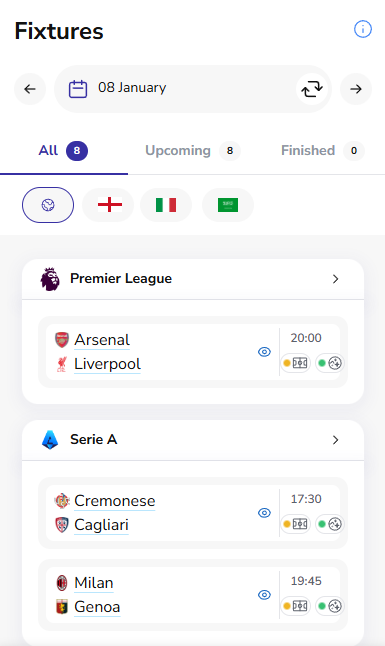
Date Navigation
At the top of the page, the date bar shows the currently selected date with back and forward arrows to move between days. Tap the calendar icon to open the date picker and jump straight to any specific date. The Reset to Today button at the bottom of the date picker brings you straight back to the current day.
The three tabs – All, Upcoming, and Finished – filter the fixture list by match status. The number badge on each tab tells you how many fixtures fall into that category for the selected date.
Competition Filter
The row of flag icons beneath the tabs lets you filter fixtures by league. The globe icon (selected by default) shows all available leagues. Click any flag to narrow the list to that competition only – useful when you only care about Premier League games on a busy mid-week night with multiple leagues in action.
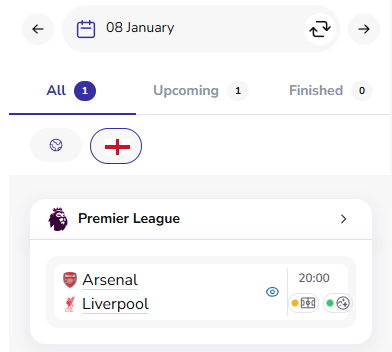
Fixtures are grouped by competition. Each group shows the league logo and name, with a chevron to expand or view more fixtures in that competition.
Reading the Data Availability Icons
Each fixture card shows a set of status icons on the right side. These tell you exactly what Statz data is available for that game right now – so you know before you click whether projections and lineups are ready.
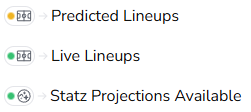
- Yellow dot + lineup icon – Predicted Lineups available. Pre-match predicted starting XIs are loaded for this fixture.
- Green dot + lineup icon – Live Lineups confirmed. The official teamsheets have been announced.
- Green dot + Statz icon – Statz Projections available. Full model projections – goals, shots, corners, fouls, yellows, and player-level props – are ready for this fixture.
Yellow means pre-match estimates; green means confirmed data. Always check the lineup icon before placing a bet builder leg – a yellow dot means the team selection is predicted, not confirmed.
Navigating to a Specific Date
Tap the calendar icon in the date bar to open the date picker modal. Browse to any month using the arrows, select a date, and the fixture list updates instantly. Use Reset to Today to return to the current day without having to navigate back manually.
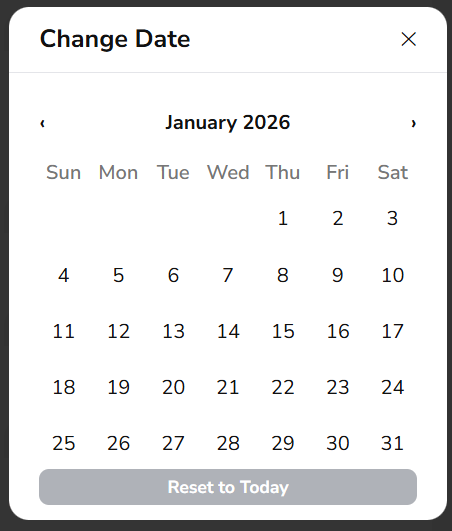
This is useful for planning ahead – check what fixtures are coming up over the next few days and see which ones already have projections loaded.
From Fixture to Full Analysis
Click any fixture card to go straight to the H2H page for that match. From there you can access the full projection suite – team stats, player-level projections, lineups, the bet builder tool, and the match narrative. The Fixtures page is the entry point; the H2H page is where the deep analysis lives.
Best Practices
✅ Check the Fixtures page each morning to see which games have projections loaded
✅ Use the competition filter on busy mid-week nights to focus on the leagues you care about
✅ Check the lineup icon colour before placing any bet builder leg – yellow = predicted, green = confirmed
✅ Use the date picker to plan ahead and identify fixtures worth researching early
❌ Don’t assume projections are available for every fixture – check the green Statz icon first
❌ Don’t treat predicted lineups as confirmed – they change, especially for rotation-heavy managers
Conclusion
The Statz Fixtures page keeps everything organised in one place. The data availability icons remove the guesswork – you always know before you click whether a fixture has projections and lineups ready. Start here every match day, filter to your competition, and click through to the H2H page for the full picture.
Visit statz.ai/fixtures to get started.
Related Guides
- H2H Page – Click any fixture from the Fixtures page to land here. This is where the full analysis suite lives: stats, projections, and lineups.
- Fixture Projections – View win/draw/loss and BTTS model probabilities across all fixtures on a given date.
- Player Projections – See which players are projected highest for each stat market across all of today’s fixtures.
- Bet Builder Tool – Once you have identified your fixture, use the Bet Builder to build a multi-leg same-game bet.