How to Use Statz Acca Tool
Overview
The Statz Acca Tool takes the guesswork out of building accumulators. Instead of picking teams based on reputation or gut feel, it filters the entire fixture list by form, venue, and opponent strength – then syncs your finished selections directly to your chosen bookmaker so you can place in seconds.
It supports two acca types: Full Time Result (backing a team to win) and BTTS (Both Teams to Score). Both use the same data-driven approach, just applied to different markets.
Where to Find It
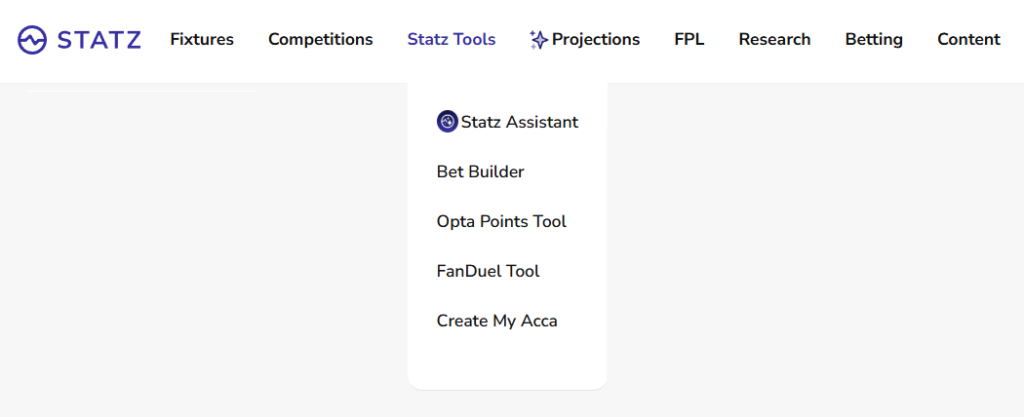
The Acca Tool is in the Statz Tools dropdown in the main navigation bar at the top of the site. Click Statz Tools and select Create My Acca from the menu. You can also go directly to statz.ai/acca.
Choosing Your Acca Type
At the top of the page, two tabs let you switch between markets:
- Full Time Result – filters teams based on their win rate. Use this when you want to back favourites with consistent winning form.
- BTTS – filters fixtures based on both teams scoring. Use this when you want to build a BTTS acca across multiple games.
Select the tab that matches your market before setting any filters – the tool reconfigures itself for the relevant data.
Step-by-Step: Building Your Acca
Step 1: Select Dates
Choose which day’s fixtures to build from. Buttons for Today, Tomorrow, and the next few days are displayed at the top. Select the date you want – the competition list and available fixtures update to match.
Step 2: Choose Competitions
Select which leagues to include. Options typically include Premier League, Championship, La Liga, Bundesliga, Serie A, Ligue 1, and more. You can mix competitions in a single acca – useful on busy mid-week nights when Premier League games are scarce.
Step 3: Team Venue
Filter by Home, Away, or Either. Home teams win more often – if you only want home favourites in your acca, select Home. Away-only accas carry more risk but better potential returns.
Step 4: Team Form (Last 5)
Set the minimum number of wins in the last 5 games required for a team to qualify. Default is 1 win minimum – raise this to 3 or 4 to filter to genuinely in-form sides only. For example, setting “At Least 4 Wins” out of the last 5 surfaces only teams in dominant recent form – sides like Liverpool, Arsenal, or Man City when they are running hot.
Step 5: Opponent Form (Last 5)
Set the maximum number of wins the opponent is allowed in the last 5. Default is 1 win maximum – this filters out fixtures where the opposition is also in strong form. Set to 0 to only include teams playing against opponents on a poor run.
Step 6: Choose a Bookmaker
Select from bet365, Ladbrokes, Coral, or Midnite. The tool will surface odds from your chosen bookmaker for each qualifying selection and calculate the combined acca price.
Step 7: Odds Between
The slider lets you set a minimum and maximum odds range for qualifying selections. This is useful for filtering out near-certainties at tiny prices (e.g. 1.10) that drag your combined price down without meaningfully reducing risk. A minimum of 1.40-1.50 tends to produce more rewarding acca prices.
Step 8: Additional Filters
- Only Include Teams with Odds – removes fixtures where your chosen bookmaker has not yet priced the market. Recommended to keep this on.
- Win % Projection Slider – adds a Statz model win probability filter. Enable this to only include selections where the Statz model agrees with the market – a useful cross-check against the form data.
- Form includes All Competitions – by default, form is calculated from league games only. Enable this to include cup and European results in the form calculation.
Step 9: Create My Acca
Hit the button. The tool returns a list of qualifying selections based on your filters, along with the individual odds and combined acca price from your chosen bookmaker. Click Add to Betslip to open the full betslip directly on the bookmaker’s site with your selections pre-loaded – ready to stake and place.
The Betslip Link
When qualifying selections are returned, a deeplink to your chosen bookmaker’s betslip is generated with all legs pre-populated. This means you do not have to manually search for each match and add it yourself – one click takes you straight to a pre-built betslip. The combined price is shown before you click, so you know what you are getting.
If your chosen bookmaker is not covering all selections (for example, a league they don’t price), the tool will flag this. In that case, try switching bookmaker or narrowing the competition selection.
Putting It Into Action: Example
You want to build a Saturday Premier League home acca:
- Select Saturday’s date
- Choose Premier League only
- Set Venue to Home
- Set Team Form to At Least 3 wins in last 5
- Set Opponent Form to At Most 1 win in last 5
- Choose bet365
- Set Odds minimum to 1.40
- Hit Create My Acca
The tool returns qualifying selections – for example, Arsenal (home, 4/5 wins) vs a struggling side, Man City (home, 3/5 wins) in a winnable fixture – with individual odds and a combined price. Click Add to Betslip to open bet365 with those selections ready to place.
Cross-reference with Statz Fixture Projections to check the model’s win probabilities on each selection before committing. If the tool and the model agree, that is a stronger signal than form alone.
Best Practices
✅ Use the form filters conservatively to start – At Least 2 wins and At Most 2 wins produces a good starting pool
✅ Always set a minimum odds threshold to avoid including near-certain legs that barely move the combined price
✅ Cross-reference with Statz Projections before finalising – form + model agreement = higher confidence legs
✅ Mix competitions on busy mid-week nights for more options
✅ Use the BTTS tab when looking at fixture-heavy weekends where goals are expected across multiple games
❌ Don’t ignore the opponent form filter – a team in good form against another team also in good form is not the same edge
❌ Don’t include legs just because they qualify – check the H2H page for confirmed lineups before finalising
❌ Don’t treat a combined price as guaranteed value – always check each leg individually makes sense
Conclusion
The Statz Acca Tool replaces gut-feel acca building with a structured, filter-based approach grounded in recent form and opponent analysis. Set your filters, generate qualifying selections, and add directly to your betslip in one click. It is the fastest way to go from data to placed bet.
Start building at statz.ai/acca.
Related Guides
- H2H Page – Always confirm lineups here before finalising any acca leg. A key player resting changes everything.
- Bet Builder Tool – Prefer single-fixture multi-leg bets? Use the Bet Builder Tool to combine player markets on one game.
- Fixture Projections – Cross-reference your acca legs with Statz win probability projections before placing.
- Player Profile Page – Research individual players to support bet builder legs within your acca.