How to Use Statz FanDuel Tool
Overview
The Statz FanDuel Tool is built specifically for FanDuel player props. It surfaces the most in-form players across the key stat markets – shots, shots on target, fouls, tackles, and more – with their hit rates calculated from recent match data and odds synced live from FanDuel.
Rather than manually researching player form across multiple sources, the tool does the filtering for you. Set your competition and stat category, and it returns the players most consistently hitting the relevant market – with FanDuel odds alongside the data so you can act immediately.
Where to Find It
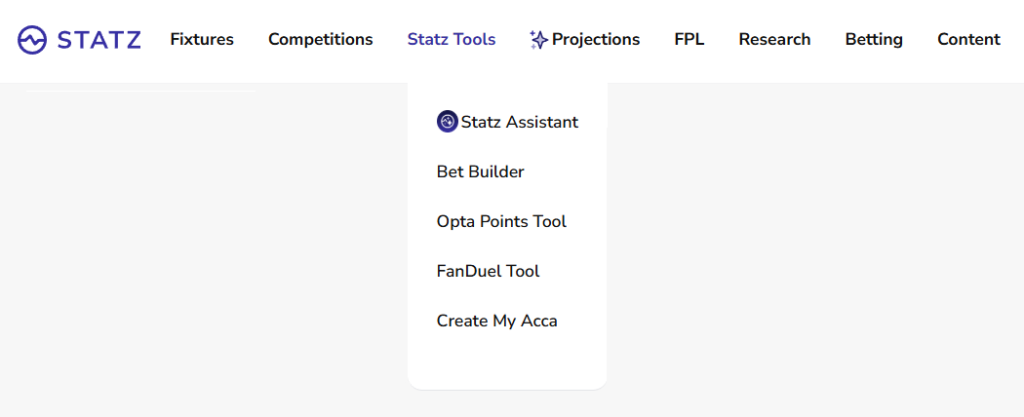
The FanDuel Tool is in the Statz Tools dropdown in the main navigation bar at the top of the site. Click Statz Tools and select FanDuel Tool from the menu.
How It Works
The FanDuel Tool works similarly to the Statz Bet Builder Tool but is calibrated specifically for FanDuel markets and odds. Where the Bet Builder surfaces selections across multiple bookmakers, the FanDuel Tool presents everything in FanDuel’s pricing format – designed for players who primarily use FanDuel for player props.
The underlying data is the same: match-by-match hit rates calculated from Statz’s database of player stats, covering every appearance across all supported competitions. A player showing a 4/5 hit rate on shots on target in the last 5 games is genuinely doing it consistently – not just in one standout performance.
Step-by-Step: Using the FanDuel Tool
Step 1: Select a Competition
Choose which league you want to pull players from. Premier League, Championship, La Liga, Bundesliga, Serie A, and Champions League are all supported. Filter to the competition your target fixture is in for the most relevant results.
Step 2: Select a Stat Category
Choose the market you are researching. Available stat categories include:
- Shots on Target – how often the player registers a shot on target per game
- Shots Total – total shot volume, useful for anytime scorer markets
- Fouls Committed – for fouls market props
- Fouls Drawn – useful for players who attract contact frequently
- Tackles – for defensive player markets
- Assists, Goals, Yellow Cards – for match outcome player props
Step 3: Set a Hit Rate Threshold
Filter the results to only show players who have hit the relevant market in a minimum percentage of their recent games. For example, filtering to 60%+ hit rate shows players who have delivered in at least 3 of the last 5 games. Higher thresholds mean stricter filtering but stronger recent form signals.
Step 4: Review Results and Odds
The tool returns a ranked list of qualifying players with their hit rate, recent form breakdown, and FanDuel odds for that market. This is the key combination: you can see both how consistently the player has hit the market and what price FanDuel is offering in one place. If a player has a 4/5 hit rate and FanDuel is pricing them generously, that is your edge signal.
Step 5: Add to FanDuel Betslip
Each qualifying selection includes a direct link to FanDuel with that player prop pre-selected. Click it to open FanDuel with the selection ready to add to your betslip – no searching, no manual entry.
Putting It Into Action: Example
You want to find Premier League players to back for shots on target this weekend:
- Select Premier League
- Select Shots on Target
- Set hit rate threshold to 60%
- Review results – the tool surfaces players like Cole Palmer, Mohamed Salah, or Bukayo Saka who have been consistently registering SOT in recent games
- Check the FanDuel odds alongside the hit rate – if Palmer is 4/5 on SOT 1+ and FanDuel has him at a healthy price, that is a strong data-backed selection
- Click the FanDuel link to open the betslip with that prop pre-selected
Cross-reference your selections with the Player Profile page for a deeper look at that player’s match-by-match data, and check the H2H page for confirmed lineups before placing.
FanDuel vs the Bet Builder Tool
Both tools use the same underlying Statz data. The difference is in the output:
- FanDuel Tool – returns individual player prop selections with FanDuel-specific odds. Best for single-leg props or building a FanDuel player props card.
- Bet Builder Tool – builds multi-leg same-game parlays across bet365, Ladbrokes, Coral, and Midnite. Best for combining multiple player markets on a single fixture.
Use the FanDuel Tool when your primary market is FanDuel and you want single-player prop recommendations. Use the Bet Builder Tool when you want to combine multiple legs into one bet.
Best Practices
✅ Filter by competition to keep results relevant to the fixtures you are betting on
✅ Use hit rate threshold of 60%+ to start – 3/5 recent games is a meaningful signal
✅ Check the player profile page for context on why they are hitting – minutes played, opposition quality, home vs away split
✅ Always confirm lineup before placing – a player’s hit rate is irrelevant if they are not starting
✅ Compare FanDuel pricing against your hit rate assessment – if the market is underpricing a consistent performer, that is your edge
❌ Don’t rely on hit rate alone – check that recent strong numbers are not inflated by weak opposition
❌ Don’t skip the lineup check – the H2H page shows predicted and confirmed starting XIs
❌ Don’t add legs just because they qualify – each selection should make sense individually
Conclusion
The Statz FanDuel Tool makes player prop research fast and structured. Filter by competition and stat category, review hit rates alongside FanDuel odds, and place directly via the pre-populated betslip link. It is the quickest way to go from data to a FanDuel player props selection you can back with confidence.
Find it at statz.ai under Statz Tools in the navigation bar.
Related Guides
- Player Profile Page – Go deeper on any player surfaced by the FanDuel Tool. Check match-by-match hit rates, set your exact line threshold, and review home vs away splits before placing.
- H2H Page – Confirm lineups before acting on any FanDuel prop. If the player is not in the predicted XI, the hit rate data is irrelevant.
- Bet Builder Tool – Want to combine multiple player legs across bet365, Ladbrokes, or Coral? Use the Bet Builder instead of or alongside the FanDuel Tool.
- Player Projections – Model-based stat forecasts for every player, filtered by competition and date.