How to use Statz Leaders Page
Overview
Whether you’re researching players for fantasy football, analysing betting markets, or tracking your favourite stars, the Statz Leaders page is designed to help you find exactly what you need quickly and efficiently. Explore top players for over 50 different statistics within your chosen competition, available for all major leagues and competitions.
Where to Find Statz Leaders
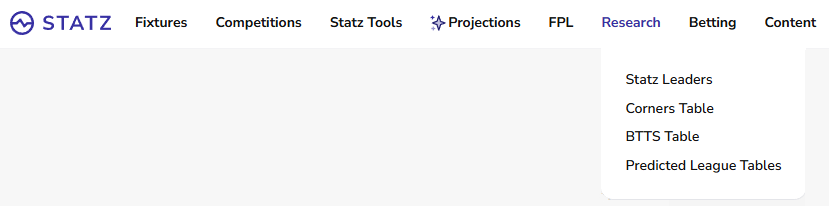
From our homepage, click the “Research” tab in the top menu bar and you will find “Statz Leaders” as shown in the image below.
How to Use
Getting Started
Once you have navigated to the Statz Leaders page, you’ll immediately see the top performers across key statistical categories. The default view shows Champions League attacking statistics, but as we’ll explore, you can customize this to show virtually any metric you’re interested in.
Understanding the Layout
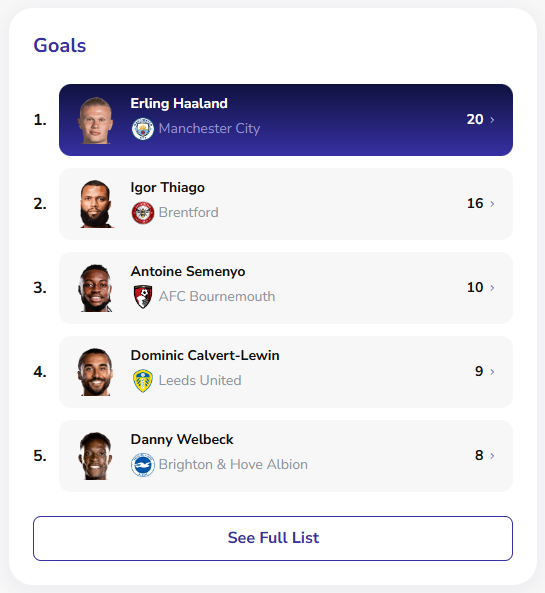
The page displays statistics in easy-to-read cards, with each card showing the top five players in that category. You’ll see player photos, their current club badge, and the numerical stat prominently displayed. For example, in the Premier League Attacking section, you can instantly see that Erling Haaland leads with 20 goals for Manchester City, followed by Igor Thiago with 16 for Brentford.
Using the Filter Dropdowns
The real power of Statz Leaders lies in the filtering options at the top of the page. Here’s how to use each one:

Competition Dropdown: Select which league or competition you want to view. While Premier League is the default, you can switch to other competitions to compare players across different leagues.
Stat Group Dropdown: This is where you choose the type of statistics you want to see. The available categories include:
- Attacking (goals, assists, shots etc)
- Defending (tackles, duels, fouls etc)
- Possession (pass completion, chances created, dribbles etc)
- Goalkeeping (goals conceded, saves, punches etc)
Total vs Per Game Toggle: This switch lets you choose between cumulative season totals and per-game averages. Toggle to “Per Game” if you want to identify the most efficient players.
Last 5 Games Toggle: Switch to see which player top each statistic over their teams last 5 games.
Advanced Filters: Click the three dots button to see what advanced filters we offer – Age group filter coming soon!
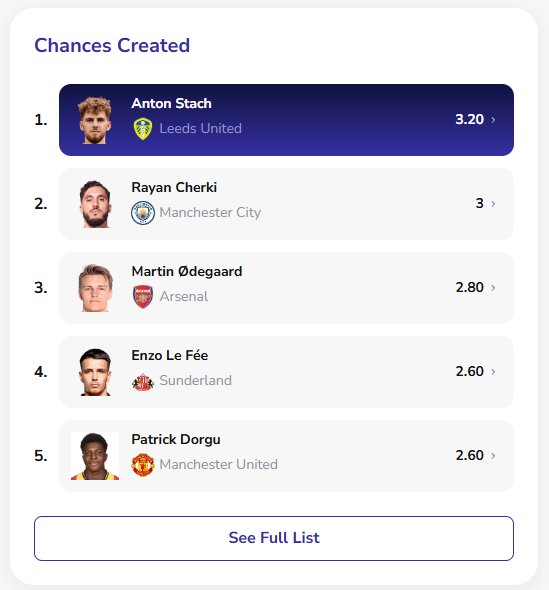
Tip: Combine multiple filters to customise your search. For example, below I have filtered to look at Per Game Possession stats over the last 5 games as I am interested in who is creating the most chances to bring into my Fantasy Premier League (FPL) team. Leeds’ summer signing Anton Stach could be one to look – 3.2 chances created per game over the last 5 games.

Viewing Complete Rankings
While each card shows the top five performers, you’ll notice a “See Full List” button at the bottom of each statistical category. This is a crucial feature that many users overlook. Clicking this button expands the view to show the complete rankings for that statistic, allowing you to:
- See where mid-table performers rank by using the scroll bar
- Compare players outside the top five
- Find underrated or overlooked players
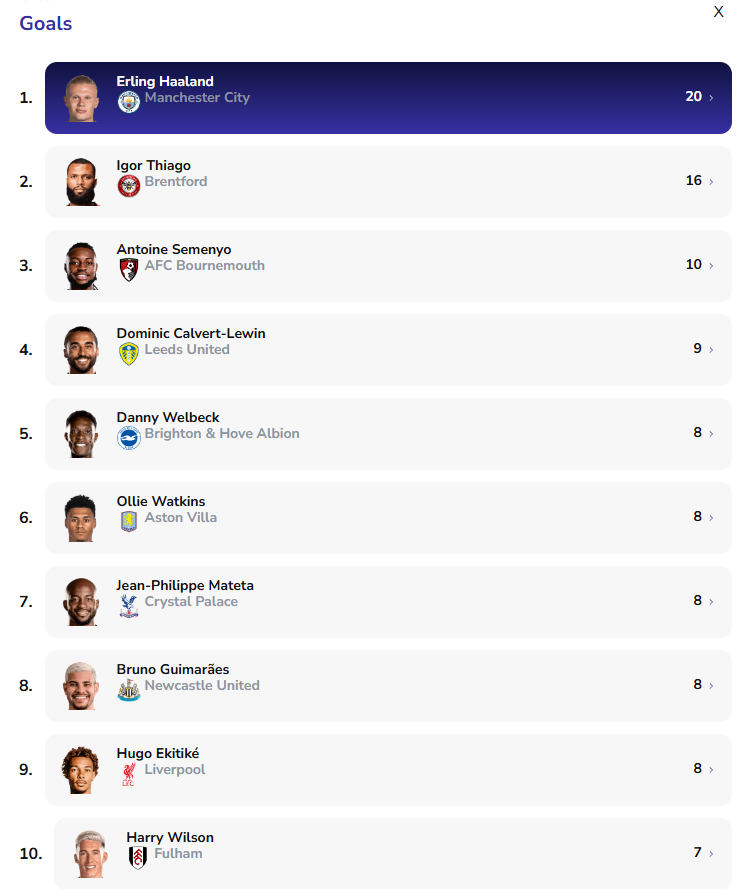
In the image below I have expanded the top goal scorer list to see more players. Fulham’s in-form Harry Wilson has snuck in at 10th place with 7 goals! To collapse the full rankings just click the X in the top right corner.
Tips for Getting the Most Out of Statz Leaders
Let’s look at how you might use Statz Leaders in real scenarios:
Combine Filters: Try switching between Total and Per Game views for the same category to get different perspectives on player performance.
Fantasy Football Research: Switch to “Per Game” view and check the Goal Involvements category to identify consistent performers who deliver attacking returns regularly, not just players who’ve played lots of games.
Betting Analysis: Switch to Last 5 games and use the full list feature to identify players on hot streaks.
Player Comparison: Want to know if Bruno Fernandes is really outperforming other playmakers? Check his position in both Assists and Chances Created, then click “See Full List” to see exactly where he ranks among all Premier League midfielders.
Conclusion
The Statz Leaders page is designed to be both simple and powerful. The default view gives you instant insights into who’s performing best, while the filters and full list features allow you to dig deeper and customize your research. Whether you’re a casual fan or a serious analyst, mastering these tools will help you stay on top of performance data for your favourite leagues.
Start exploring today, experiment with different filter combinations, and don’t forget to use those “See Full List” buttons to get the complete picture. Happy stat-hunting!