The FPL Team Planner That Does Your Homework For You: Import, Project, Optimise
Every FPL manager runs the same weekly loop. Check the fixtures. Second-guess two transfers. Wonder whether the captaincy is right. Do it all in your head, on a bus, four minutes before the deadline. The Statz FPL Team Planner exists to run that loop properly: your actual squad, projected points on every player, fixtures for the run ahead, and an optimiser that proposes your next moves - with its reasoning shown.
It's the piece of the Statz FPL toolkit that ties everything else together, and this is the full tour: what it does, how the optimiser thinks, and why the managers using it are making decisions with numbers the official app simply doesn't have.
Get your squad in, in seconds
Three ways in, no typing your team out player by player. Enter your FPL Team ID and the planner pulls your real squad, bank and chips. Start from scratch if you're planning a draft. Or - the party trick - upload a screenshot of your team from the official app, and the planner reads the players off the image and rebuilds your squad automatically.
Once you're in, your squad, transfers and plans save to your account, so the plan you sketch on your laptop is waiting on your phone at the deadline.
The pitch view: your team, with the numbers switched on
The planner's home screen looks like your team - a proper pitch, shirts, bench - but every player carries the number the official app never shows: projected points for the gameweek, from the same Statz model behind the Season Rankings. The header runs the totals for you: your bank, free transfers, a Team Rating out of 100, and your squad's total projected points for the gameweek.
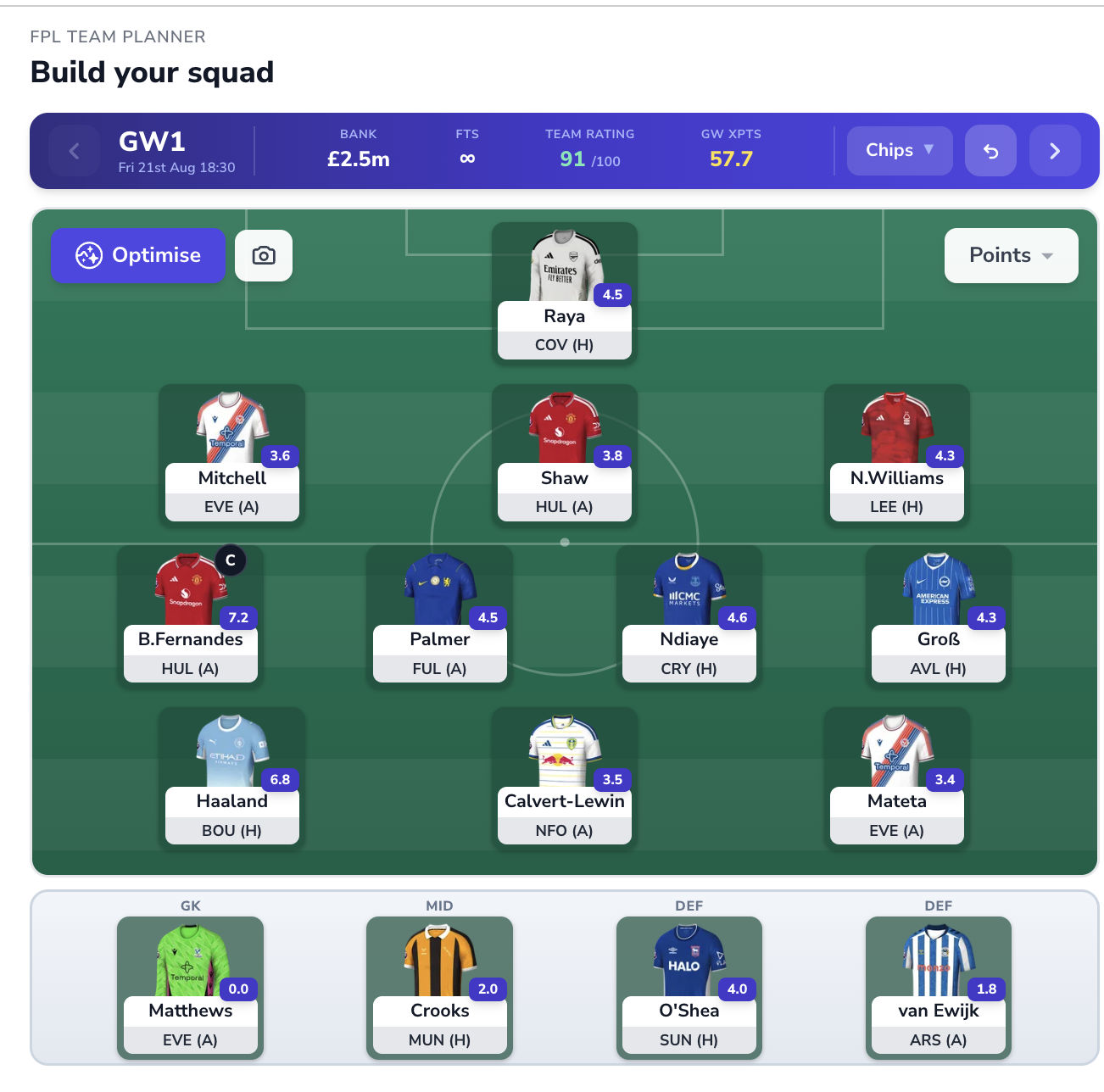
Step forward through the gameweeks with the arrows and the whole squad re-projects against each week's fixtures - so "should I hold this transfer?" becomes a question you can answer by looking. Chips live in the header too, so a Wildcard or Bench Boost can be planned into a specific week rather than panic-played. And the camera button exports your squad as a shareable image for the group chat.
The transfer market, sorted by what actually matters
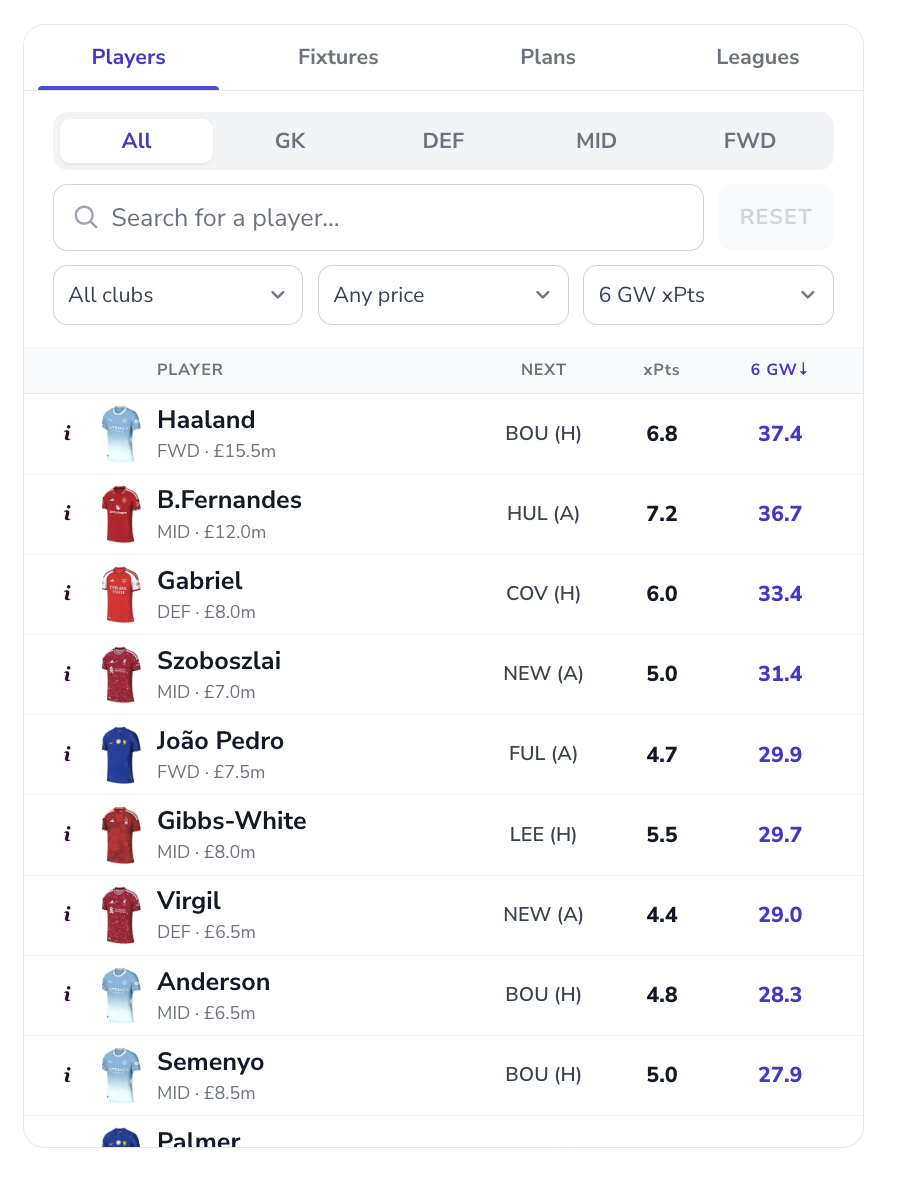
The Players panel is a transfer shortlist with projections built in: search anyone, filter by position, club or price, and sort by projected points over the next six gameweeks rather than last season's totals. One column tells you what a player is likely to do for the week ahead; the six-gameweek column tells you what he's worth across the run - which is the number transfers should actually be bought on.
Fixtures as a heatmap, three ways
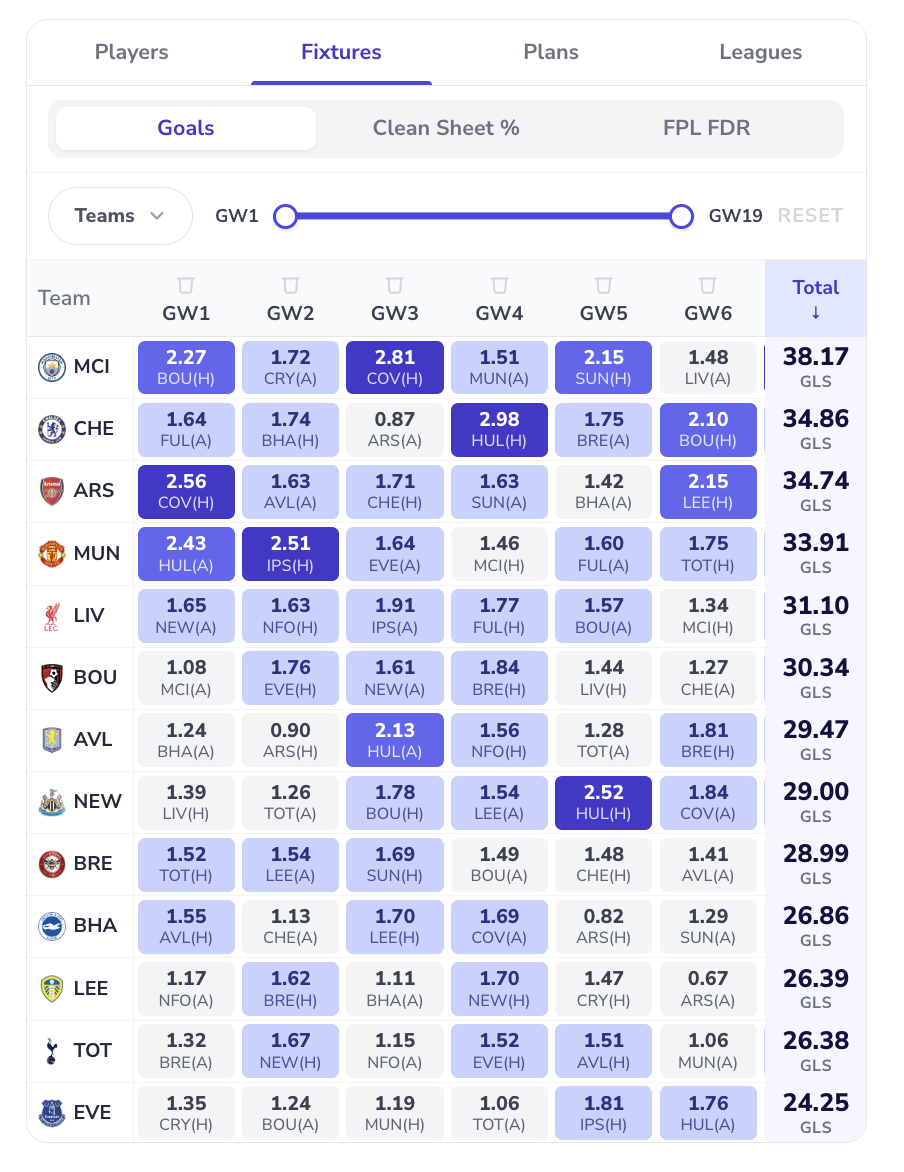
The Fixtures tab turns the run-in into a heatmap you can read at a glance, with a gameweek range slider and three modes: projected goals per fixture, clean sheet percentage, and classic FPL FDR if you want the official difficulty view. Totals rank every club across your chosen window, so "whose fixtures turn?" stops being folklore and becomes a sorted column.
Optimise: the feature that earns the bookmark
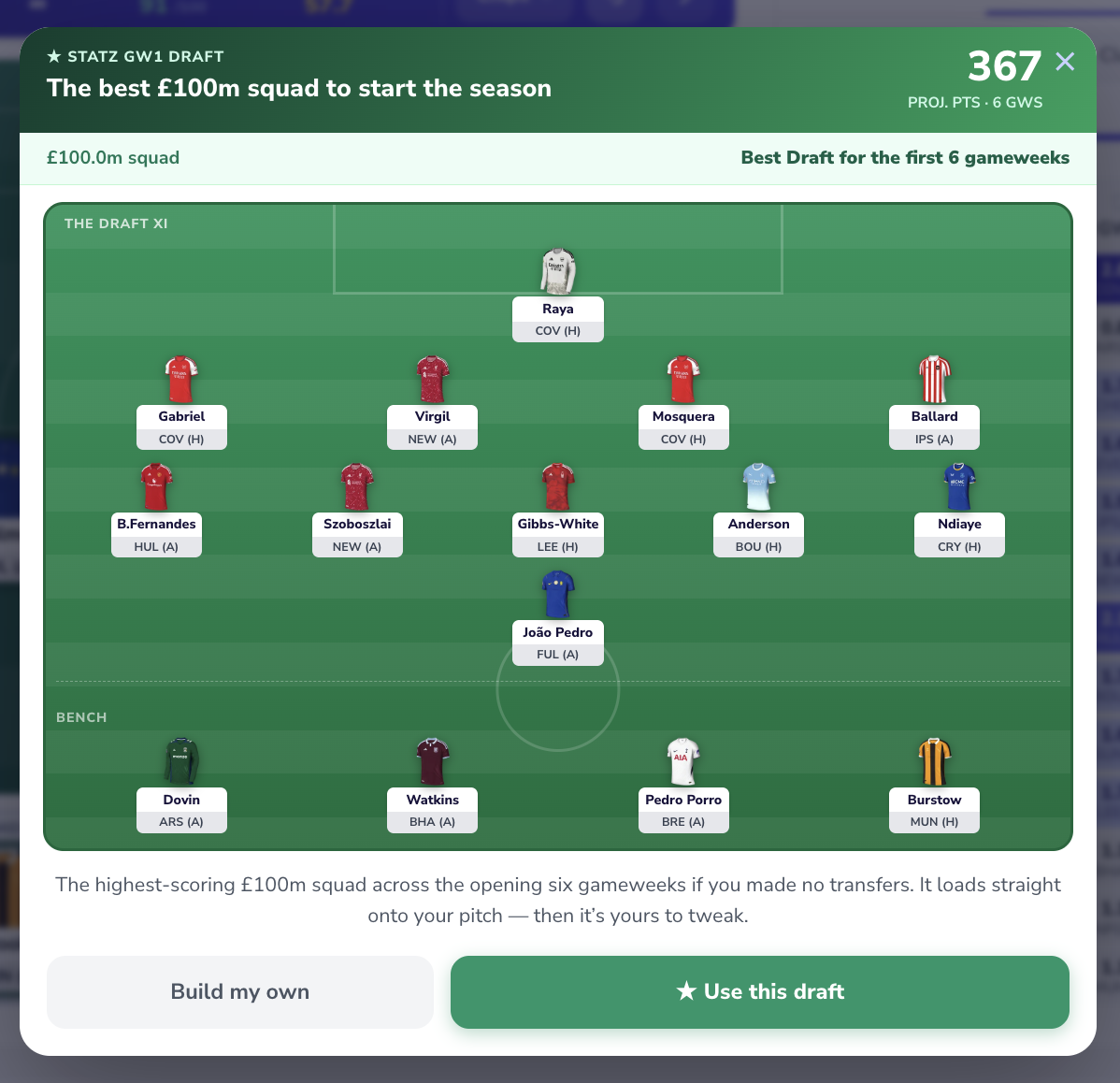
Then there's the button that separates this from every fixture ticker and rate-my-team thread: Optimise. It works in two modes. Starting fresh - or holding a wildcard - it builds the best £100m squad for the next six gameweeks outright, with its projected total attached, and loads it straight onto your pitch to tweak. With your real squad in, it proposes a concrete transfer plan instead: which players out, which in, in which gameweek, whether a points hit is worth taking, and what the whole package is projected to gain.
Two things make it trustworthy rather than a black box. First, every move shows its working: the incoming and outgoing player's projected points for each of the next six fixtures, side by side, with captaincy-ceiling weeks flagged. Second, the "Why these moves?" panel says it in plain English - a fixture swing, a captaincy upgrade, value released from the bank - and the arithmetic is printed at the bottom: points in, points out, minus any hit, equals the net gain. Agree with it and one tap applies the plan; disagree and you've still learned exactly where the model thinks your squad is leaking points.
Plans, leagues and the weekly routine
Everything you sketch saves as a Plan - so you can keep a safe route and an aggressive route side by side and decide on deadline day, with an undo button for every experiment along the way. The Leagues tab brings your mini-league into the planner, because half of FPL is knowing what the manager above you is likely to do next.
Under the hood it's the same engine as the rest of the toolkit: projections built on expected minutes first (the Season Rankings model), refreshed as new data lands, sharpened by the predicted line-ups behind Team News. The planner is where those numbers stop being a leaderboard and start being your decisions: fifteen minutes a week, squad in front of you, projections on every option.
The planner is free to try with your own squad at statz.ai/fpl/my-team - full projections and the optimiser are part of FPL Pro.
FAQs
What is the Statz FPL Team Planner? A squad-planning tool at statz.ai/fpl/my-team that loads your real FPL team and adds what the official app doesn't have: projected points on every player, multi-gameweek fixture heatmaps, chip planning, saved transfer plans and an optimiser that proposes your next moves with the reasoning shown.
How do I import my FPL team into the planner? Three ways: enter your FPL Team ID and it pulls your squad automatically, build a squad from scratch, or upload a screenshot of your team from the official app and the planner reads your players off the image.
What does the FPL optimiser do? It analyses your squad, bank, free transfers and the projections for the coming gameweeks, then proposes specific transfers - including when a points hit is worth it - showing the six-gameweek projection for every player in and out, plus a plain-English explanation and the net expected points gain.
Is the FPL Team Planner free? Importing and building your squad is free with a Statz account. Full player projections and the optimiser are part of FPL Pro.
Questions
What is the Statz FPL Team Planner?
A squad-planning tool at statz.ai/fpl/my-team that loads your real FPL team and adds what the official app doesn't have: projected points on every player, multi-gameweek fixture heatmaps, chip planning, saved transfer plans and an optimiser that proposes your next moves with the reasoning shown.
How do I import my FPL team into the planner?
Three ways: enter your FPL Team ID and it pulls your squad automatically, build a squad from scratch, or upload a screenshot of your team from the official app and the planner reads your players off the image.
What does the FPL optimiser do?
It analyses your squad, bank, free transfers and the projections for the coming gameweeks, then proposes specific transfers - including when a points hit is worth it - showing the six-gameweek projection for every player in and out, plus a plain-English explanation and the net expected points gain.
Is the FPL Team Planner free?
Importing and building your squad is free with a Statz account. Full player projections and the optimiser are part of FPL Pro.